Why Templates Matter in Interior Design
Interior design projects often follow a repetitive structure—walls, floors, furniture, lighting, and presentation scenes. Without a template, designers are forced to recreate the same setup every time, leading to wasted time and inconsistent project organization.
The course highlights that professional workflows always begin with:
- Setting correct measurement units
- Organizing the workspace
- Defining modeling structure before drawing anything
This structured approach ensures that designers don’t “start projects without a clear structure,” a common problem identified in the course introduction.
Configuring Units for Precision
A key step in creating a custom template is defining the correct unit system. For interior designers, this often means switching to millimeters or centimeters instead of default units.
This small adjustment has a major impact:
- Eliminates scaling issues when importing CAD drawings
- Ensures accurate dimensions for furniture and layouts
- Aligns the model with real-world construction standards
Courses consistently emphasize unit setup as one of the first actions when initializing SketchUp, reinforcing its importance in professional workflows.
Optimizing the Workspace with Default Trays
Another efficiency boost comes from organizing the SketchUp interface through custom default trays. Instead of navigating through menus repeatedly, designers can preload essential panels such as:
- Tags (Layers): for organizing elements like walls, furniture, lighting
- Outliner: for managing object hierarchy and structure
- Scenes: for saving views, layouts, and presentation angles
By embedding these into a template, designers create a ready-to-use workspace tailored specifically to interior design tasks.
Eliminating Repetitive Setup Tasks
The course strongly advocates for reducing repetitive actions by saving a fully configured file as a template. This includes:
- Predefined tags for common elements (walls, floors, furniture)
- Standard scene setups (plans, elevations, perspectives)
- Clean file structure for better performance
This aligns with broader professional training approaches, where templates are used to speed up modeling and maintain consistency across projects.
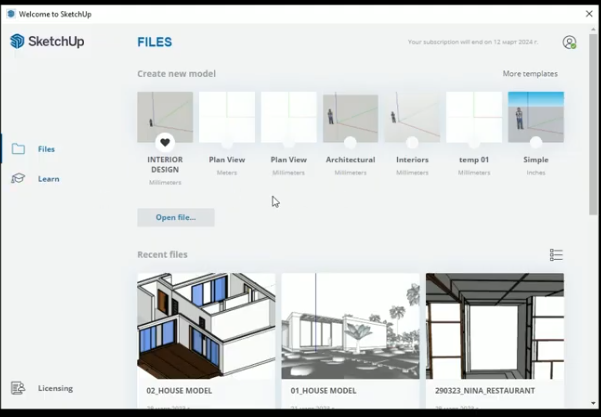
Starting Projects Faster and Smarter
Once a template is created, every new project begins in an optimized environment. Instead of spending time on setup, designers can immediately focus on:
- Space planning
- 3D modeling
- Design decisions
This shift from “setup time” to “design time” is one of the biggest productivity gains highlighted in the course.
Watch the lesson in our Free Interior Design Course:
Key Takeaway
Custom templates transform SketchUp from a general modeling tool into a specialized interior design system. By investing time upfront in configuration, designers can:
- Work faster
- Stay organized
- Deliver more consistent, professional results
In short, templates are not just a convenience—they are a core efficiency strategy for modern interior design workflows.
COURSE REFERENCE
This workflow is demonstrated step by step in the interior design visualization course, using real projects in SketchUp, Enscape, and Twinmotion. The course focuses on material behavior, environmental context, and lighting decisions that remove flatness directly inside the rendering engines.
Related articles