3D Modeling
Stop Overpaying for CAD: Get A Smarter Alternative to AutoCAD
BricsCAD doesn’t just match AutoCAD — in many areas, it outperforms it where it matters most: cost, flexibility, and efficiency.
Unlike AutoCAD LT, which places limitations on customization, BricsCAD allows users to easily migrate and reuse their existing AutoCAD LISP routines.
Managing multiple CAD software installations and dealing with fragmented industry toolsets is a significant IT burden for many firms. BricsCAD solves this complexity by housing 2D drafting and 3D modeling within a single, integrated and unified design platform.
This unified DWG environment seamlessly incorporates advanced industry-specific workflows, offering robust integrations like BricsCAD Mechanical, BricsCAD BIM, and uniquely, a fully integrated civil and land survey toolset directly in BricsCAD Pro.
Consolidating these solutions into one environment eliminates the need for expensive plugins and multiple disparate software packages, significantly reducing both the learning curve and maintenance costs.
Beyond its core architecture, BricsCAD is built to support superior customization, fully supporting LISP, .NET, and BRX APIs.
These routines often run faster than ever in BricsCAD without requiring any reprogramming, enabling teams to automate complex, everyday workflows.
BricsCAD also features strong third-party application support, with hundreds of industry-specific applications developed by best-in-class partners available to further tailor the software.
Features like the Quad cursor provide an AI-based, heads-up display that learns your behavior and suggests the most relevant tools directly at your cursor, keeping your focus completely on the design.
Powerful tools like Blockify automatically detect repetitive 2D geometry and convert it into block definitions in seconds, replacing tedious manual drafting. Additionally, innovations like Move Guided and Copy Guided automatically align entities to surrounding geometry and automatically heal trimmed lines.
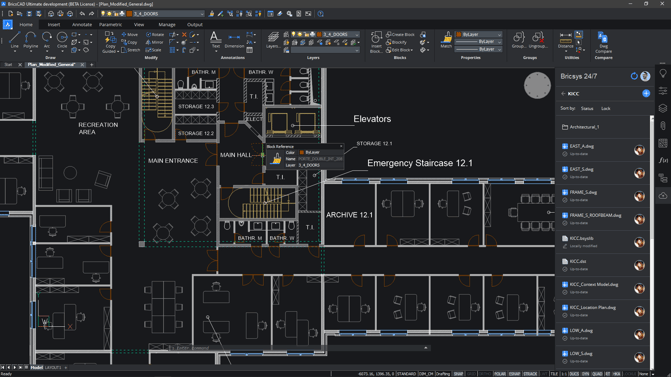
To ensure users can maximize these features, BricsCAD Assist offers an AI-powered chat panel built directly into the interface, delivering instant access to relevant documentation, practical how-to tips, and workflow guidance.
If you consider switching to BricsCAD, you may also find these articles useful:
BricsCAD doesn’t just match AutoCAD — in many areas, it outperforms it where it matters most: cost, flexibility, and efficiency.
Users can choose between single, network, perpetual (buying), and subscription (renting) options.
Learn how #BricsCAD V26.2's 30 new and enhanced features improve how teams design, manage data, and move through CAD workflows.