AECO Space
Boosting Efficiency with Custom Interior Design Templates in SketchUp
Custom templates transform SketchUp from a general modeling tool into a specialized interior design system
Flat interior renders fail to convince clients. Learn what causes them and how material depth, context, and lighting restore realism.
Many interior designers experience the same frustration: the layout is correct, materials are assigned, lighting is active — yet the final render feels sterile, flat, or unmistakably computer-generated.
Clients often struggle to emotionally connect with these images. Instead of seeing a space they can imagine inhabiting, they see something closer to a technical diagram. This disconnect makes approvals harder and undermines confidence in the design, even when the concept itself is strong.
Flatness in renders is rarely caused by missing geometry. It is almost always the result of how surfaces interact with light — and how much environmental information the image contains within the broader interior visualization workflow.
A flat render is not defined by a lack of detail, but by a lack of surface behavior and contextual variation.
From a visualization perspective, realism emerges when the renderer receives enough data to simulate how light behaves in imperfect, uneven, and layered environments. When that data is missing, light spreads evenly, shadows appear harsh, and surfaces read as uniform planes.
The course workflow approaches this problem through two parallel ideas:
Material depth — how surfaces physically react to light
Environmental complexity — how surrounding elements break visual uniformity
Together, these determine whether a render feels spatial and atmospheric or visually flat.
Most flat renders begin with native SketchUp colors or overly generic materials. Replacing them with Enscape or Twinmotion library materials is necessary — but insufficient on its own.
Render-ready materials introduce texture maps and reflectivity, but without refinement they still behave like flat stickers applied to geometry. The visual upgrade is minimal unless the material parameters are actively adjusted.
Material replacement sets the foundation, but depth is created in the next stages.
For materials such as brick, stone, or heavily textured surfaces, realism depends on perceived relief.
Enabling displacement maps — referred to as Parallax in Twinmotion — allows textures to cast self-shadows and respond to light unevenly. This transforms a flat wall into a surface with dimensional presence.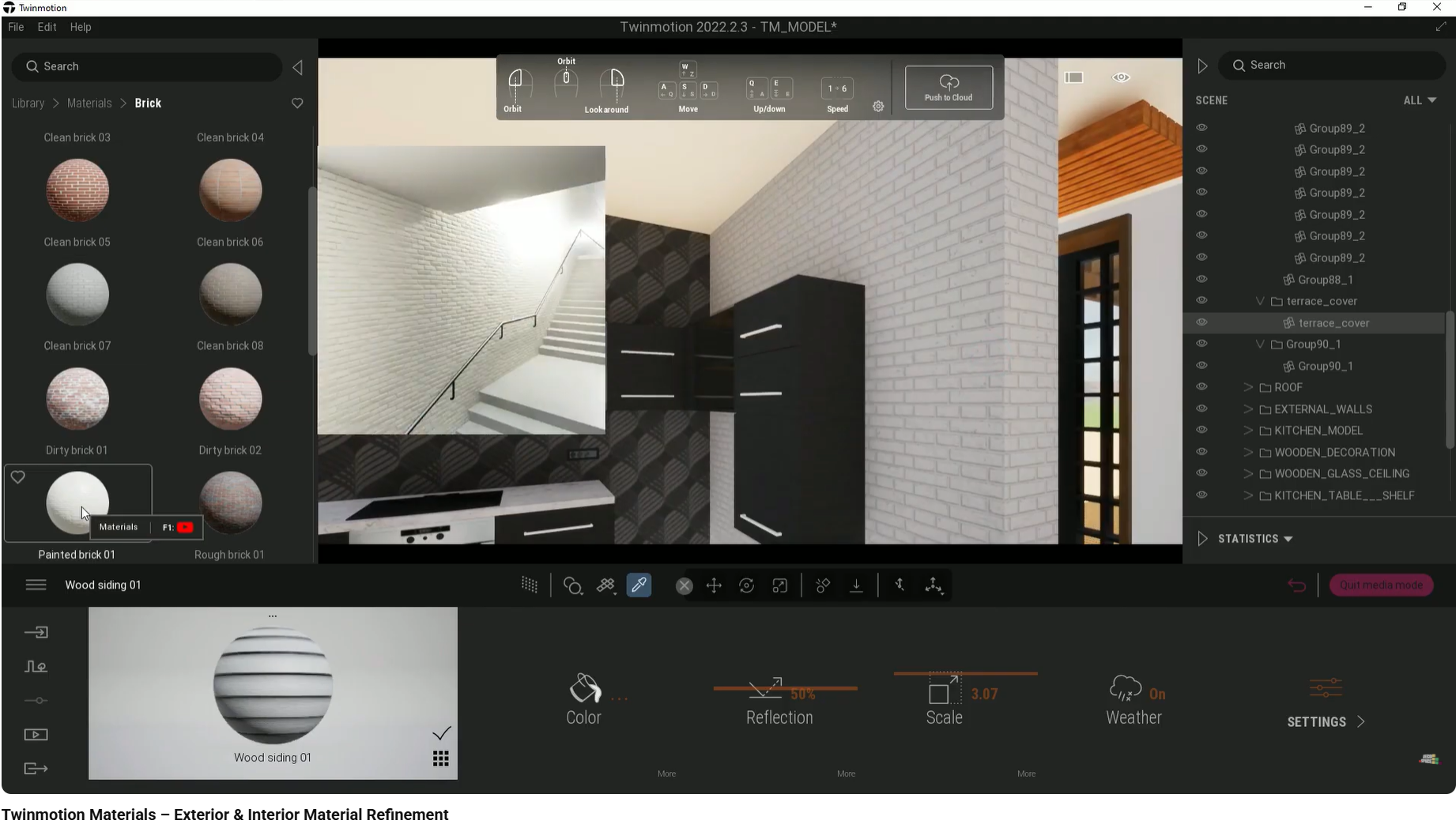
Without this step, even high-resolution textures remain visually shallow, especially under directional lighting.
Uniform reflectivity is another major contributor to flatness.
Real materials scatter light inconsistently. By adjusting roughness and reflection maps, surfaces begin to catch highlights selectively instead of reflecting light evenly across the entire plane.
This variation is subtle, but it is essential. It introduces micro-contrast that signals realism to the viewer.
Texture direction affects how light interacts with a surface.
Wood grain running against structural logic — for example, vertical grain on horizontal decking — disrupts visual credibility. Rotating textures to align with construction logic ensures highlights follow material behavior rather than revealing the texture as a 2D overlay.
This is a small technical decision with a disproportionate impact on perceived quality.
Interior renders do not exist in isolation. What surrounds the space is as important as the space itself.
Empty exteriors, flat ground planes, or uniform surroundings strip the image of scale and realism. The building begins to resemble a model rather than a lived environment.
Using multi-asset placement or vegetation paint tools introduces controlled chaos: variation in height, spacing, and density that mimics real landscapes.
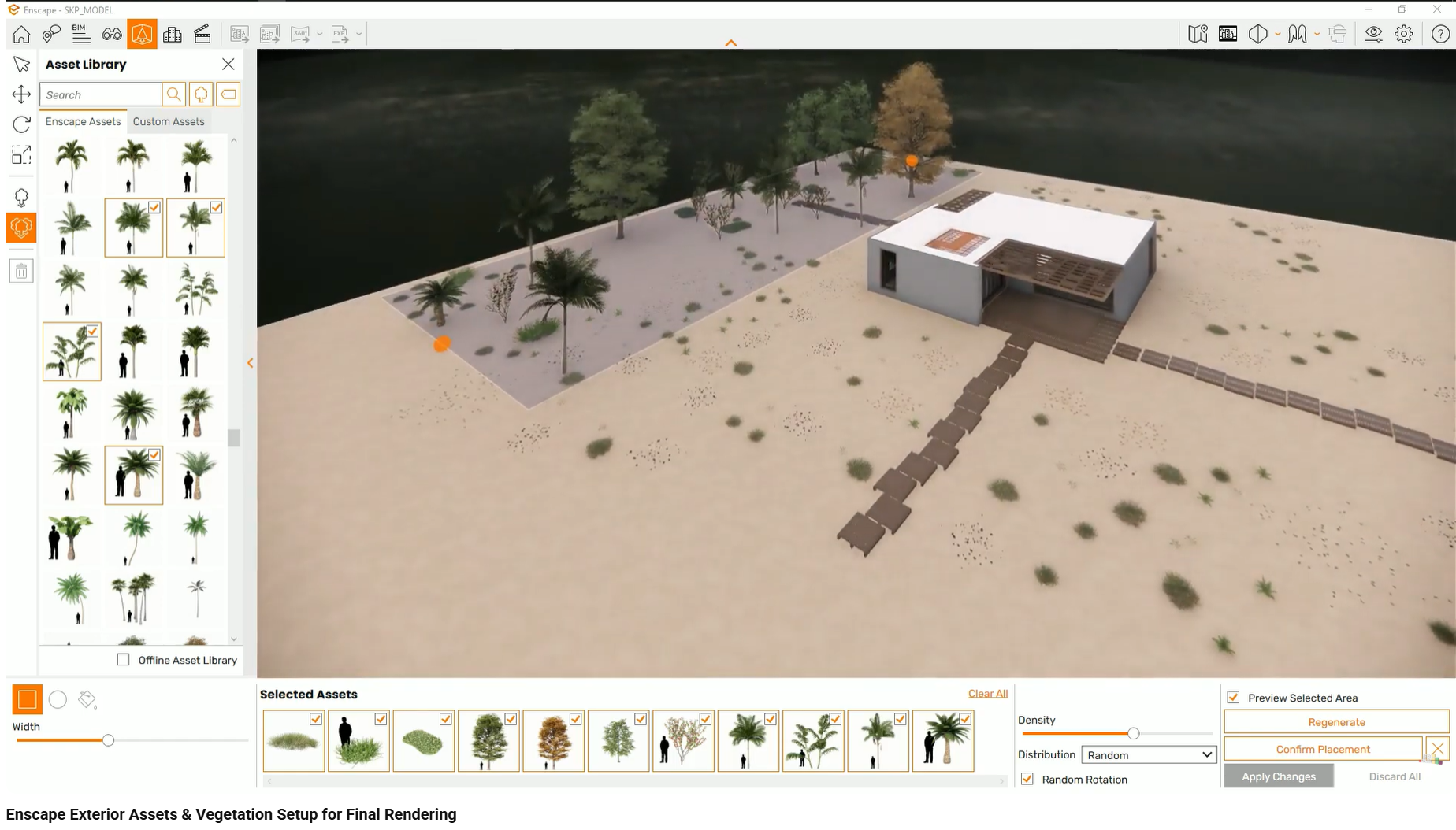
This environmental noise frames the architecture and prevents the horizon from reading as an artificial boundary.
Lighting is often technically correct but perceptually wrong.
Default render settings frequently produce shadows that are too sharp and too dark. In reality, atmospheric diffusion softens shadow edges and reduces contrast.
Reducing shadow sharpness allows light to behave more naturally, restoring depth and subtle gradation across surfaces.
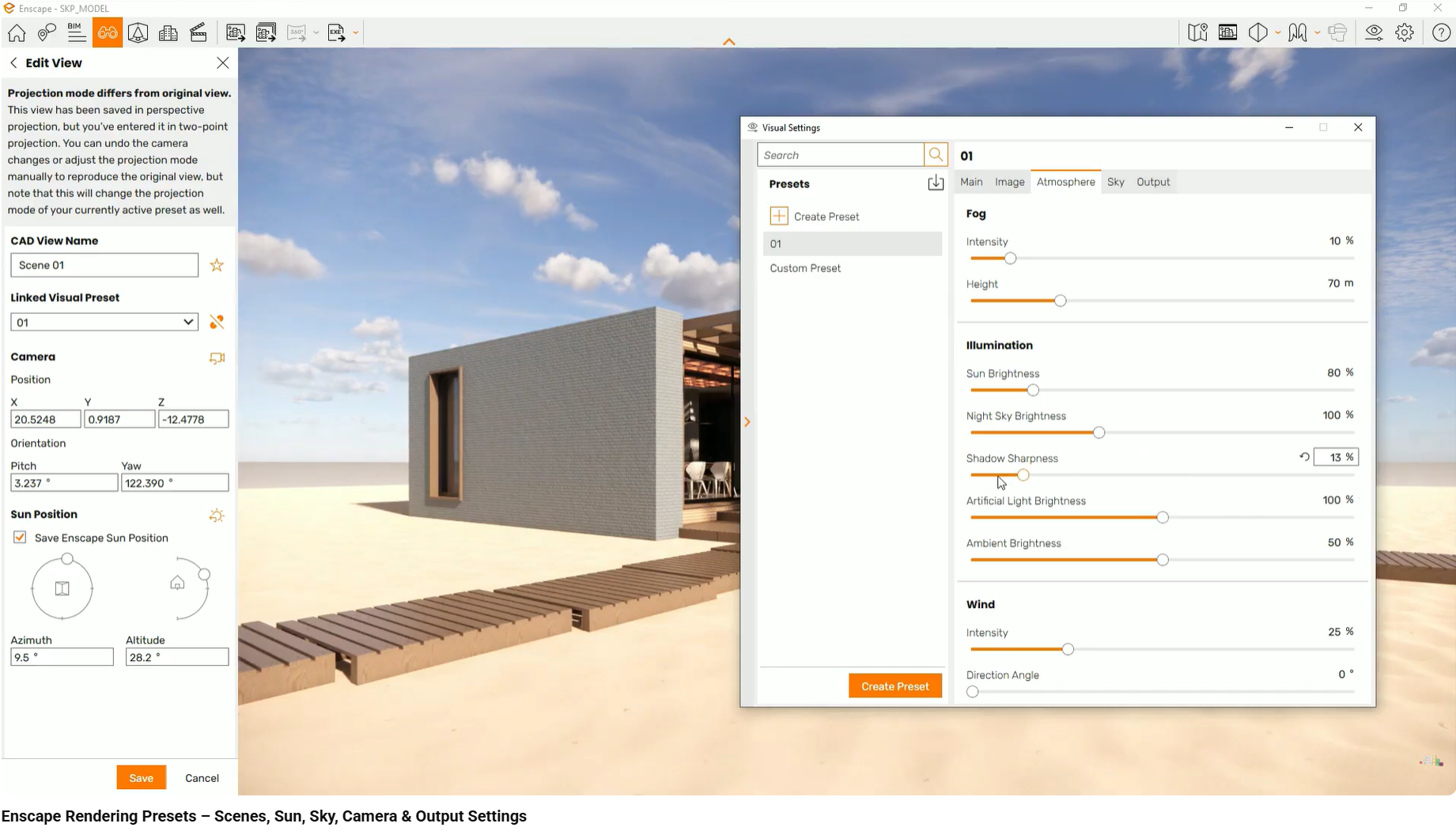
This adjustment alone can dramatically change how volume and distance are perceived in an image.
What goes wrong:
Materials appear pasted onto geometry with no tactile presence.
Why it happens:
Displacement is disabled, or texture orientation is incorrect.
Client perception:
Surfaces feel cheap, synthetic, or unfinished — even when the design is refined.
What goes wrong:
Views through windows or surrounding environments feel barren and artificial.
Why it happens:
Manually placing assets feels time-consuming, so environments are left minimal.
Client perception:
The project feels isolated from reality, like a scale model rather than a real space.
What goes wrong:
Shadows appear harsh, black, and visually dominant.
Why it happens:
High shadow sharpness remains unchanged from default settings.
Client perception:
The image feels cold, aggressive, and clearly computer-generated.
These issues rarely occur in isolation. Together, they compound and reinforce the sense of flatness, even in otherwise well-modeled scenes.
This workflow is demonstrated step by step in the interior design visualization course, using real projects in SketchUp, Enscape, and Twinmotion. The course focuses on material behavior, environmental context, and lighting decisions that remove flatness directly inside the rendering engines.
This article focuses on removing flatness through material refinement, environmental layering, and lighting behavior. Topics such as texture creation, post-processing, and photographic compositing are covered separately.
Custom templates transform SketchUp from a general modeling tool into a specialized interior design system
As highlighted throughout our SketchUp interior design course, mastering the native tools is only the beginning. The real leap in productivity comes...
How interior designers make materials look realistic in 3D by controlling scale, orientation, depth, and surface behavior.